AI Agent Integrations
Bring GeoVector intelligence into the tools where work happens
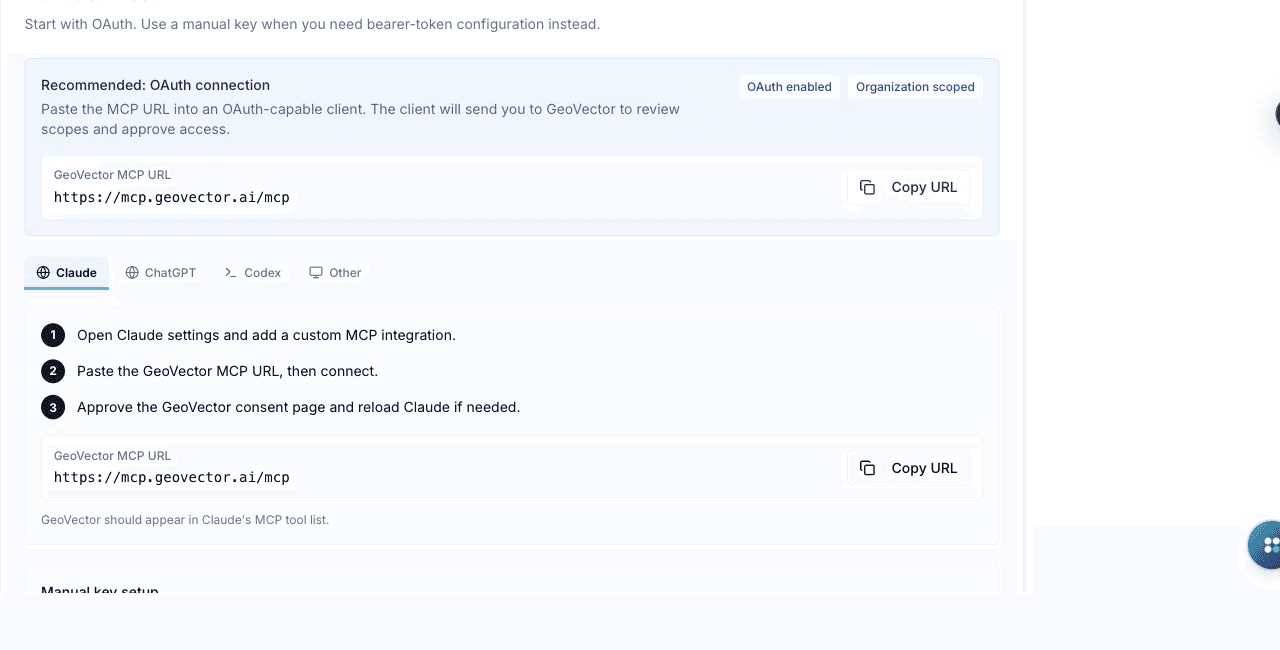
Connect AI agents and assistants to your GeoVector workspace through the Model Context Protocol (MCP). Give Codex, Claude, ChatGPT, and other compatible clients scoped access to visibility data and workflows, with OAuth connections, manual keys, permissions, expiry, and audit history controlled by your organization.
- Connect compatible AI clients
- MCP-native
- Choose the access level
- Read or write
- Expiry, revocation and activity history
- Auditable
실제로 살펴보기
주요 이점
Agent-Ready Workflows
Let compatible assistants retrieve workspace insight and, when authorized, run GeoVector actions without rebuilding the context by hand.
Organization-Scoped Control
Choose read-only or read-and-write access, connect through OAuth or manual keys, and revoke credentials immediately when needed.
One Protocol, Many Clients
Use the same MCP connection model with Codex, Claude, ChatGPT, and other compatible clients and automation environments.
Secure, explicit access through MCP
GeoVector exposes workspace capabilities through the open Model Context Protocol. Connections are organization-scoped and can be approved through OAuth or created as manual keys. Administrators choose read-only or read-and-write access; plaintext keys are shown once, expire automatically, and can be revoked immediately. Security activity records credential and connected-app events for operational review.
주요 사용자
Ask an AI assistant to investigate a visibility drop using current prompt, citation, competitor, and sentiment data from the workspace.
Move from analysis to an authorized content workflow while keeping the agent grounded in the same GeoVector evidence used by the team.
Issue read-only or read-and-write credentials, inspect recent security activity, and revoke or rotate access without changing the dashboard configuration.