Prompt Engineering: Forcing Consistency with Auxiliary Outputs
improve the robustness of model output by asking the model for an additional, related output field. This simple change forces the model to be more consistent and accurate.
Large Language Models (LLMs) reduced the barrier for adopting ML techniques for various tasks like OCR, translation, summarization, and many many more. They are becoming increasingly popular. However, they are also known to be not 100% reliable and non-deterministic.
The Use Case
Recently I used LLM to process my credit card statements. They’re in PDF or images. The APIs I used treat PDFs as images too and apply OCR to extract the statements.
After a few rounds of iterations, I came up with the following prompt:
You are an expert at extracting structured transaction data from PDF documents.
### Important ###
Extract structured transaction data. Make sure to extract ALL transactions from ALL pages. Ensure value and columns match.
### Rules ###
- All amounts should be numeric values only (remove currency symbols and commas).
- This is a credit card statement. The amount should be negative by default with a negative sign, unless it's a credit indicated with CR or other words.
- For fields which spread across lines, fold them into a single line.
- For dates, make sure it's in dd MMM yyyy format.
### Output ###
Output in JSON format.
Extract the following fields:
- Post Date: Transaction posting date in dd MMM yyyy format.
- Tran Date: Transaction date in dd MMM yyyy format.
- Description: Transaction description
- Amount: Transaction amount. Default is negative unless the value of the field specifies it's credit.
Return the data in JSON format with the following structure:
{
  "data": [
    {
      "post_date": "15 Apr 2023",
      "transaction_date": "15 Apr 2023",
      "description": "BUS/MRT 53063825 1719",
      "amount": "-2.49",
    }
  ]
}
return {"data": []} if you cannot find any transaction data. Do NOT return other text.
Make sure to EXTRACT ALL TRANSACTIONS FROM ALL PAGES. DO NOT SKIP THE FIRST PAGE.
The prompt works well for most of the PDFs I tried. However, for some PDF files from a particular bank, it couldn't reliably tell when it was a credit transaction.. From time to time, it mis-classifies a credit transaction as a debit transaction or vice versa.
The screenshot below shows one example of such a transaction: I have a credit transaction from Lazada, an e-commerce platform where I received a refund payment.
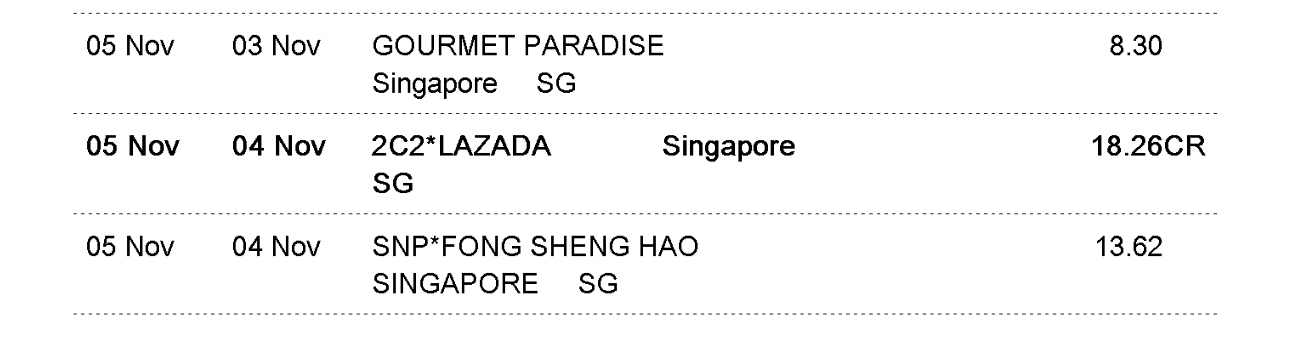
And the model output the following:
{
   "post_date": "05 Nov 2024",
   "transaction_date": "04 Nov 2024",
   "description": "2C2*LAZADA      Singapore",
   "amount": -18.26,
 },
If I were to guess, LLM has seen far more number of debit transactions from credit card or bank account statements, and the instruction mentioned “amount should be negative by default”, even though it also says “unless it's a credit indicated with CR or other words”, the LLM couldn’t reliably tell it’s a credit rather than debit. I played with the temperature parameters a bit, tried 0 or higher values but it didn't help.
Multi Dimension Output
I updated the prompt to ask for one more output: positive_reason. This new field asks the model to explicitly state the evidence for why an amount would be positive (a credit).
You are an expert at extracting structured transaction data from PDF documents.
### Important ###
Extract structured transaction data. Make sure to extract ALL transactions from ALL pages. Ensure value and columns match.
### Rules ###
- All amounts should be numeric values only (remove currency symbols and commas).
- This is a credit card statement. The amount should be negative by default with a negative sign, unless it's a credit indicated with CR or other words.
- For fields which spread across lines, fold them into a single line.
- For dates, make sure it's in dd MMM yyyy format.
### Output ###
Output in JSON format.
Extract the following fields:
- Post Date: Transaction posting date in dd MMM yyyy format.
- Tran Date: Transaction date in dd MMM yyyy format.
- Description: Transaction description
- Amount: Transaction amount. Default is negative unless the value of the field specifies it's credit.
- Positive Reason: The reason for why the amount is positive based on the text of the amount column.
Return the data in JSON format with the following structure:
{
  "data": [
    {
      "post_date": "15 Apr 2023",
      "transaction_date": "15 Apr 2023",
      "description": "BUS/MRT 53063825 1719",
      "amount": "-2.49",
      "positive_reason": ""
    }
  ]
}
return {"data": []} if you cannot find any transaction data. Do NOT return other text.
Make sure to EXTRACT ALL TRANSACTIONS FROM ALL PAGES. DO NOT SKIP THE FIRST PAGE.
The model can then reliably output:
{
     "post_date": "05 Nov 2024",
     "transaction_date": "04 Nov 2024",
     "description": "2C2*LAZADA      Singapore",
     "amount": 18.26,
     "positive_reason": "CR"
 }
Intuition on Why This Works
I think there are a couple of reasons this works. Firstly, the additional field asks for the reason when the amount is positive, which could encourage the model to think more about its amount field output. This basically uses some ideas from Chain of Thought (CoT): ask the model to show its reasoning. I tried tweaking the prompt to not output the positive reason, but simply be more careful on the amount sign, which doesn’t work as well. So this isn’t the only reason.
Secondly, LLMs are trained to remain consistent in their reasoning and answers. Even when their answers are incorrect, they have some sort of consistent reasoning in the answer. Asking for the particular additional output (positive reason) increases the difficulty for the model to produce an incorrect answer which needs to be consistent between amount and positive_reason.
In the particular example,
- “18.26” AND “CR” are consistent.
- “-18.26” AND “CR” is not,
- “-18.26” AND <some other reason> might be consistent but not easy to come up with a highly probable <some other reason>.